Registering for your Personal Finance Portal is simple. We’ve put together this short guide to walk you through each stage of the registration process, from receiving your invitation to accessing your portal for the first time.
Getting Started
Your financial adviser will send you an invitation to register for the personal finance portal. This invitation is important as it includes a unique URL address and the correct registration domain needed to access the portal.
On Desktop
- Open your internet browser
- Click the link in your invitation email or type in your personal finance portal URL (https://citygatefp.gb.pfp.net/)
- Complete the registration process using the details provided
Steps for registering:
- Go to the personal finance portal login screen.
- Select Register.
- Enter an Email Address
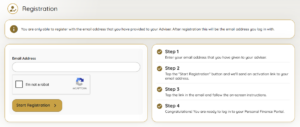
Now you’re here, you will need to:
- Select I’m not a robot.
- Select Start Registration.
- An email will then be sent to the address used in the registration.
- Select the activation link
- Complete the security questions (Please note answers should match the information we hold on file).
- Enter a Password (a minimum of 8 characters with one number and one capital letter).
- Re-enter your password.
- Complete the activation process.
Once this is completed, you can:
- Log in with your username and password
- You’re now ready to access your portfolio, documents, and other features
———————————————————————————————————————————————————————————————————————–
Additional set up
Now you’re all set up with a login, if you wish to have the web-based app on your mobile device you can do the following:
On Mobile (Smartphone or Tablet)
- Open the internet browser on your device
- Type in your personal finance portal URL (https://citygatefp.gb.pfp.net/)
- Log in with your username and password
- Select Get the App to install the personal finance portal app

5. Follow the on-screen instructions to complete installation (these vary by phone type and operating system, but guidance is provided on screen)
6. Once installed, you can access the portal directly from your home screen like a regular app

7. Now you can get to the personal finance portal by clicking on the logo on your home screen and entering your username and password.
What You Can Do Once Set Up
Once you’ve registered and logged in, you’ll have access to:
- Portfolio: View your assets, liabilities, funds, and valuations
- Profile: Update your personal information and circumstances
- Documents: Upload and securely share documents with your adviser
- Messaging: Communicate safely with your financial adviser
- Goals: Track and manage your financial goals
Your adviser controls what information and plans are shared with you on the portal, so you’ll see what’s relevant to your relationship with them.